Skip to content

A real estate Instagram carousel from your listing photos.

One listing gives you a feed carousel of up to 8 slides in 4:5, plus a caption for each network, next to the walkthrough video. No design tool, no template to fill.

  • 7-day free trial
  • Cancel any time
  • Fast

Updated October 17, 2026By the Scenella team

AI-enhanced
A 10-photo listing, made with Scenella. Address and price are fictional.

From listing photos to a carousel.

Add the photos

Add the listing photos. Scenella reads each one and puts the rooms in walking order, the same order the video follows.

Render the listing

One render makes the walkthrough video and the whole Listing Kit, the carousel included.

Post the carousel

Open the Kit tab, swipe through the slides, edit the caption written for Instagram and post.

What makes a listing carousel work.

A listing carousel is a short story told in swipes. The viewer decides on the first slide whether to keep going, so the order matters more than the number of slides. These are the choices that carry a carousel, whichever tool you use.
  • Sample carousel slide 1
  • Sample carousel slide 2
  • Sample carousel slide 3
  • Sample carousel slide 4
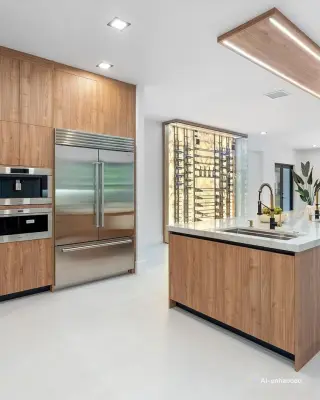
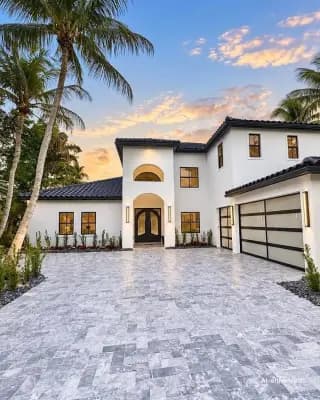
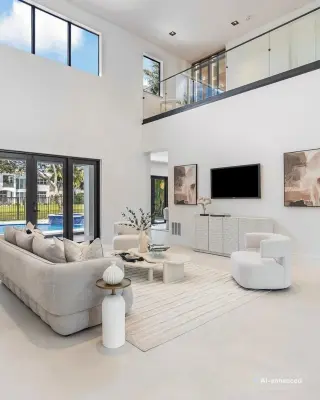
Four slides of the carousel for a fictional listing, 2150 Palm Crest Dr. Each carries its label.

Start with the best exterior or the best room

The first slide is your cover. Use the photo that makes someone stop scrolling: the front of the home in good light, or the most striking room if the exterior is plain. Do not open with a floor plan or a bathroom.

Keep to one idea per slide

One room or one feature per slide. A slide that shows a kitchen, a view and a floor plan at once says nothing quickly. If a room matters, give it its own slide.

Order the slides like a visit

Walk the buyer in through the front door: exterior, living space, kitchen, main bedroom, then the outdoor area. A carousel that follows the path of a viewing feels like one, and it matches the order of a walkthrough video, so the two posts support each other.

Say little on the slide

The photo does the work. A short line at most, such as the room name, is enough. Keep the price, the address and the facts in the caption, where they can be edited and searched.

Lead with one concrete detail, not the address. Name the neighborhood, give the one or two facts that decide the visit, and end with a clear next step such as booking a viewing. Write a different caption for each network, because the same text rarely suits Instagram, Facebook and LinkedIn.

Be clear about what is edited

If a photo is AI-enhanced or virtually staged, say so. Scenella burns the label into every slide, so it travels with the image when someone saves or reposts it. Labels are the right habit even when you build a carousel by hand, and they keep the post honest about what the home looks like.

What Scenella builds for you

Scenella takes the photos you already have and, in the same render as the walkthrough, cuts the carousel from the first scenes of the tour, in tour order and in 4:5. Nothing is added to the home. You open the Kit tab, swipe through the slides, edit the caption and post.

  • Every slide carries the AI-enhanced label, or Virtually staged on a staged photo, never both.

What you get with the carousel.

Slides in 4:5 portrait, 1080 by 1350 pixels, sized for the Instagram feed.

Up to 8 slides, taken from your tour photos in tour order, so the carousel matches the video.

Captions written for each network from your listing details, ready to edit.

A share page for the seller and room reels to post alongside the carousel.

What it costs per listing.

One price covers the whole listing: both formats, the Kit and scene edits. Monthly plans, cancel any time.

Listings a monthPer listingPer month
5 listings$17.80$89
10 listings$14.90$149
20 listings$12.95$259
Prices in USD. Your currency is shown on pricing.

Questions about real estate Instagram carousels.

What is a real estate Instagram carousel?

A single feed post with several swipeable images. For a listing, it shows the home as a short run of slides instead of one photo.

How many slides does Scenella make?

Up to 8, one for each of the first photos of your tour, in tour order. A 5-photo tour gives 5 slides.

What size are the slides?

4:5 portrait, 1080 by 1350 pixels.

Do the slides show the AI label?

Yes. Every slide carries AI-enhanced, or Virtually staged when that photo is staged. A slide never carries both.

Can I edit the caption?

Yes. Captions arrive written from your listing details, one for each network, and you can edit them before you post.

Do I need a design tool or a template?

No. The slides are built from your photos in the same render as the video, so there is nothing to lay out.

Get a carousel with your next listing.

  • 7-day free trial
  • Cancel any time
  • Fast